
XML sitemap errors can quietly undermine your entire SEO strategy, preventing search engines from discovering and indexing your most important pages. Whether you're dealing with broken URLs, incorrect formatting, or validation failures, these technical issues demand immediate attention.
A single malformed sitemap can cause Googlebot to abandon the crawl entirely, leaving dozens or even hundreds of pages invisible to searchers. For SEO professionals and webmasters managing large sites, running a sitemap error checker on a regular basis is not optional; it's a core part of technical SEO hygiene. The good news is that most XML sitemap errors follow predictable patterns and have straightforward fixes.
If you need a starting point, you can scan and validate your XML sitemap errors to identify exactly what's broken before diving into repairs. This guide walks through the most common problems and shows you how to resolve each one with precision.
Key Takeaways
- Validate your sitemap against the XML schema before submitting it to search engines.
- Remove all URLs returning 4xx or 5xx status codes from your sitemap immediately.
- Keep individual sitemap files under the 50,000 URL and 50MB limits.
- Match your sitemap URLs exactly to canonical tags to avoid indexing conflicts.
- Schedule automated sitemap validation weekly to catch errors before crawlers do.
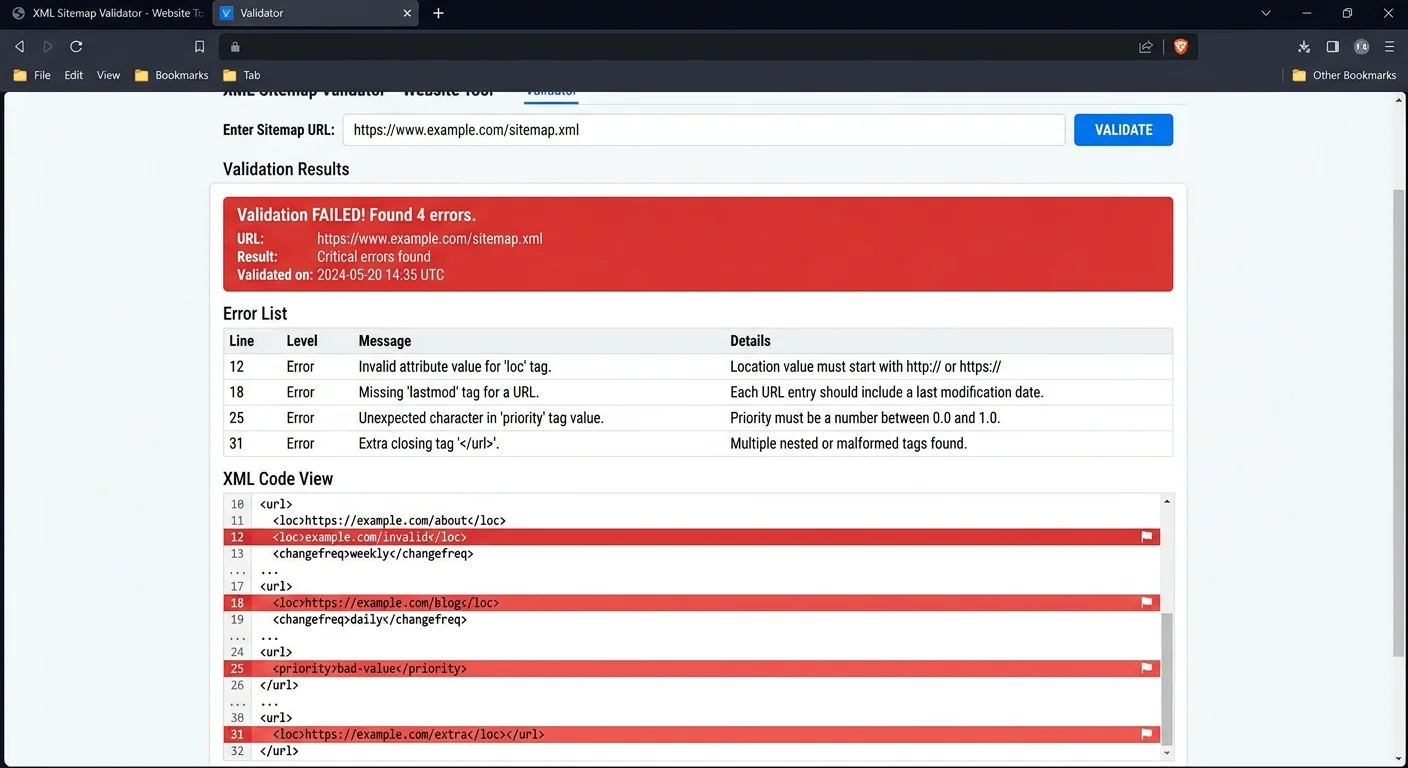
1. Identify and Fix XML Formatting Errors
Malformed XML Tags
The most fundamental sitemap errors stem from malformed XML syntax. Missing closing tags, improperly nested elements, and unescaped special characters will cause parsers to reject your entire sitemap file. Google's crawler is surprisingly strict about XML compliance; a single unclosed <url> tag can render the whole document unreadable. You should validate your sitemap against the official sitemap protocol schema before every submission.
Special characters are a frequent culprit. Ampersands in URLs must be encoded as &, and characters like < and > need their respective HTML entities. Content management systems sometimes generate URLs with raw ampersands, especially for query parameters in filtered pages or campaign tracking URLs. Run a quick find-and-replace across your sitemap file to catch these before validation.
A single unescaped ampersand in one URL will invalidate your entire XML sitemap file.
Encoding and Namespace Issues
Your XML declaration must specify UTF-8 encoding, and the root element needs the correct namespace declaration. The proper namespace is http://www.sitemaps.org/schemas/sitemap/0.9. Omitting this or using an outdated namespace URL will trigger validation failures in most sitemap checker tools. Some older generators still reference deprecated schema versions that modern crawlers may not fully support.
Byte order marks (BOMs) present another subtle problem. If your text editor or CMS inserts a BOM at the start of the file, XML parsers may fail silently or throw cryptic errors. Save your sitemap as "UTF-8 without BOM" to eliminate this issue. You can verify this with a hex editor or by checking the first three bytes of your file for the sequence EF BB BF.
Also Check: How to Check Your XML Sitemap for SEO Issues
Use a command-line tool like xmllint to validate your sitemap locally before uploading it to your server.
2. Resolve URL-Level Problems in Your Sitemap
Broken and Redirected URLs
Including URLs that return 404 or 500 status codes in your sitemap wastes crawl budget and signals poor site maintenance to search engines. Google Search Console will flag these as errors, and repeated offenses can slow down how often Googlebot visits your domain. Every URL listed in your sitemap should return a clean 200 status code. Audit your sitemap monthly using an HTTP status checker to identify stale entries.
Redirected URLs (301 or 302) are almost as problematic. While Google will eventually follow redirects, including them in your sitemap adds unnecessary crawl steps and creates ambiguity about which URL you consider authoritative. Replace every redirected URL with its final destination. If a page has been permanently removed and redirects to a category or homepage, remove that entry from the sitemap entirely rather than pointing crawlers through a redirect chain.
Canonical URL Mismatches
A sitemap URL that contradicts its own page's canonical tag creates a direct conflict for search engines. If your sitemap lists https://example.com/page but the page's canonical points to https://example.com/page/ (with a trailing slash), Google has to guess which version you prefer. This inconsistency can result in neither version being indexed reliably. Always ensure exact string matching between sitemap entries and canonical declarations.
Protocol mismatches (HTTP vs. HTTPS) fall into this same category and remain surprisingly common during or after site migrations. Your sitemap should exclusively contain HTTPS URLs if your site has migrated. For guidance on structuring your sitemap to avoid these pitfalls, review these sitemap best practices that cover canonical alignment and URL consistency in detail.
3. Fix Sitemap Size and Structure Violations
Exceeding Size Limits
The sitemap protocol enforces two hard limits: 50,000 URLs per file and 50MB uncompressed file size. Exceeding either limit means search engines will stop processing the file partway through, leaving some pages undiscovered. Large e-commerce sites and publishers frequently hit these ceilings without realizing it, especially when product variants or paginated archives inflate the URL count. Monitor your sitemap file size after every major content addition.
Gzip compression helps with the file size limit but does nothing for the URL count restriction. If you're approaching 50,000 URLs, split your sitemap into multiple files organized by content type or site section. A well-structured sitemap index file can reference up to 50,000 individual sitemaps, giving you an effective maximum of 2.5 billion URLs. For most sites, splitting by category (products, blog posts, landing pages) provides the best balance of organization and manageability.
The 50MB limit refers to uncompressed file size. Your compressed .gz file can be much smaller, but the extracted content must stay under 50MB.
Sitemap Index Errors
Sitemap index files have their own set of common mistakes. The namespace for a sitemap index is the same as individual sitemaps, but the root element must be <sitemapindex> rather than <urlset>. Mixing these up is a frequent error that causes parsers to reject the entire file. Each <sitemap> entry within the index should contain a <loc> pointing to an accessible, valid child sitemap.
Cross-domain references in sitemap index files require special attention. You can only reference sitemaps hosted on the same domain (or verified subdomains) as the index file itself. Attempting to include sitemaps from unverified domains will cause search engines to ignore those references completely. If you manage multiple domains, each needs its own sitemap index submitted through its respective Search Console property.
| Error Type | Severity | Detection Method | Fix |
|---|---|---|---|
| Unescaped ampersand | Critical | XML validator | Replace & with & |
| 404 URL in sitemap | High | HTTP status checker | Remove URL from sitemap |
| Canonical mismatch | High | Crawl audit tool | Align canonical with sitemap URL |
| File exceeds 50MB | Critical | File size check | Split into multiple sitemaps |
| Wrong namespace | Critical | XML validator | Use sitemaps.org/schemas/sitemap/0.9 |
| 301 redirect in sitemap | Medium | HTTP status checker | Replace with final destination URL |
| Missing lastmod tag | Low | Sitemap validator | Add accurate lastmod dates |
4. Establish an Ongoing Validation Workflow
Automated Monitoring
Fixing sitemap errors once is not enough. Sites change constantly as pages are added, removed, and restructured. Without automated monitoring, new errors will accumulate between manual audits, and you may not discover them until your organic traffic dips. Set up a weekly automated validation check using a dedicated sitemap error checker that alerts you when problems appear. This proactive approach catches issues before search engine crawlers encounter them.
Build sitemap validation into your deployment pipeline if your site uses continuous integration. A pre-deployment check that validates XML syntax and verifies that all listed URLs return 200 status codes will prevent broken sitemaps from ever reaching production. This is especially important for dynamically generated sitemaps where code changes can introduce formatting errors silently. Even a basic shell script running xmllint and curl against your sitemap URLs adds meaningful protection.
"The best sitemap maintenance strategy catches errors before search engines do, not after indexing problems surface in your analytics."
Integration with Search Console
Google Search Console's sitemap report provides direct feedback on how Google processes your sitemap, but it updates with a delay. Don't rely on it as your primary error detection method. Instead, use it as a secondary confirmation that your independent validation catches the same issues. Compare the "Discovered URLs" count against your sitemap's actual URL count; significant discrepancies indicate problems that may not trigger explicit error messages.
Resubmit your sitemap through Search Console after making significant fixes to prompt a fresh crawl. While Google will eventually re-crawl your sitemap on its own schedule, resubmission accelerates the process. Track the "Last read" date in Search Console to confirm Google has processed your updated version. If the read date doesn't update within a week of resubmission, check that your sitemap URL is accessible and that your robots.txt isn't blocking it.
Add your sitemap URL to your robots.txt file using the Sitemap directive to help all compliant crawlers discover it automatically.

Frequently Asked Questions
?How do I find and fix unescaped ampersands in my XML sitemap?
?Is xmllint better than an online sitemap checker for validation?
?How long does setting up weekly automated sitemap validation take?
?Does a BOM in a UTF-8 sitemap always cause an obvious error message?
Final Thoughts
XML sitemap errors range from minor annoyances to serious roadblocks that prevent entire sections of your site from appearing in search results. The fix for most issues is straightforward once you know what to look for: validate your XML syntax, audit every URL for correct status codes, respect the protocol's size limits, and keep your sitemaps aligned with canonical tags.
Building a regular validation workflow transforms sitemap maintenance from a reactive scramble into a routine task. Treat your sitemap as a living document that requires the same attention as your content, and your technical SEO foundation will be significantly stronger for it.
Disclaimer: Portions of this content may have been generated using AI tools to enhance clarity and brevity. While reviewed by a human, independent verification is encouraged.