
A sitemap error checker is one of the most practical tools in any SEO professional's toolkit. Your XML sitemap acts as a roadmap for search engines, directing crawlers to every important page on your site. But what happens when that roadmap contains broken links, outdated URLs, or structural problems? Search engines struggle to index your content, and your organic visibility takes a hit.
Whether you manage a small business site or a sprawling enterprise domain with thousands of pages, regularly scanning your sitemap for errors is a non-negotiable part of technical SEO. In this guide, you'll learn exactly how to scan sitemap URLs, detect common errors, validate your sitemap's structure, and make your pages easier for search engines to discover. We'll walk through the process step by step, using real tools and actionable techniques that you can apply today.
Key Takeaways
- Run your sitemap through a sitemap error checker at least once per month.
- Broken URLs and incorrect status codes are the most common sitemap problems.
- Valid XML structure directly impacts how search engines crawl your site.
- Automated scanning tools save hours compared to manual URL-by-URL checks.
- Fixing sitemap errors can lead to measurable improvements in indexation rates.
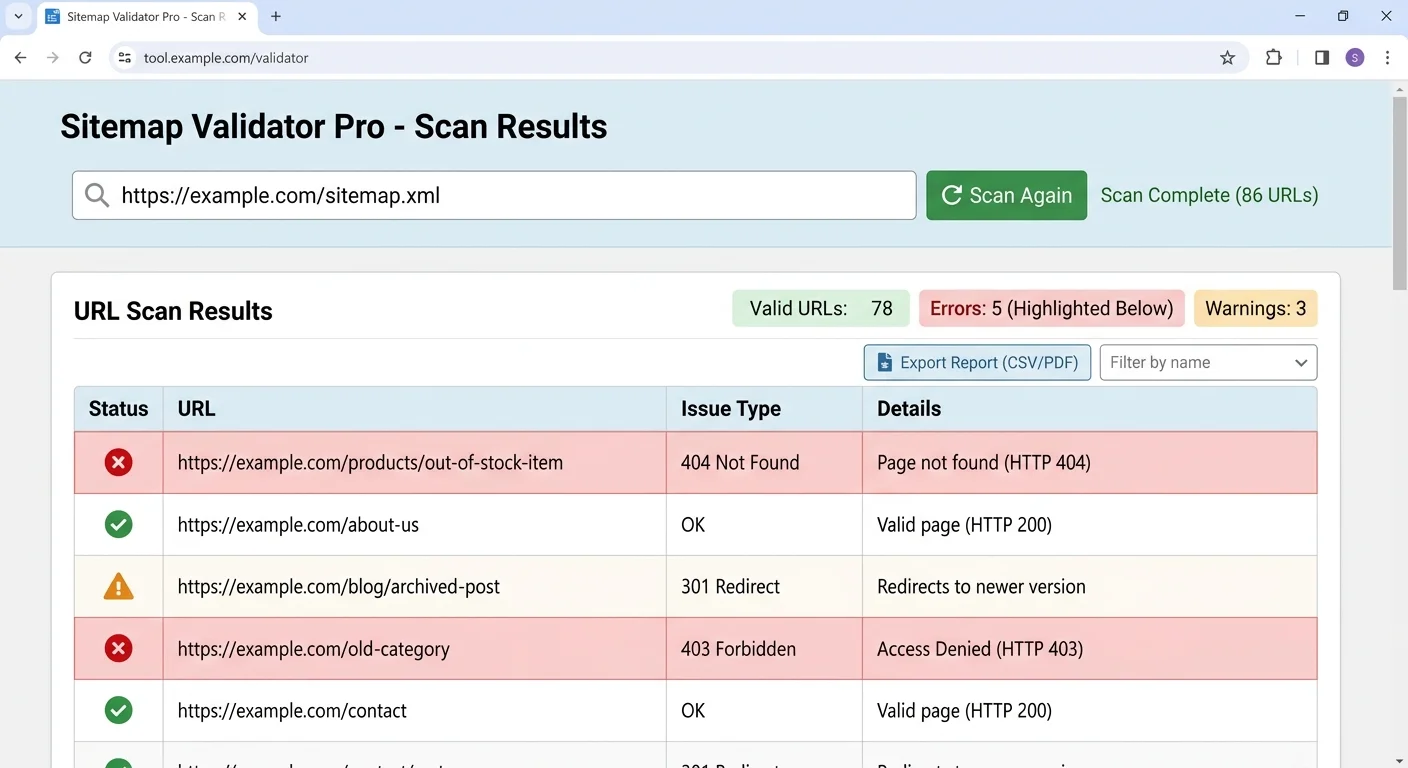
Step 1: Scan Your Sitemap URLs for Broken Links and Errors
The first step in any sitemap audit is scanning every URL listed in your sitemap to verify that each one returns a proper HTTP 200 status code. This might sound straightforward, but sitemaps on active websites accumulate problems quickly. Pages get deleted, URLs get restructured, and redirects pile up. A sitemap error checker automates this process by fetching each URL and reporting its status, saving you from the tedious work of checking links one by one.
Choosing the Right Sitemap URL Scanner
A good sitemap url scanner should handle large sitemaps efficiently, support sitemap index files, and provide clear reporting on HTTP status codes. Tools like Sitemap Validator are purpose-built for this task, letting you paste your sitemap URL and receive a full diagnostic report within seconds. Free options exist, but they often cap the number of URLs they'll check, which becomes a problem for larger sites with tens of thousands of pages.
When evaluating scanners, look for features like batch processing, redirect chain detection, and exportable reports. The ability to distinguish between soft 404s (pages that return a 200 status but display error content) and genuine 404s is particularly valuable. Some tools also cross-reference your sitemap URLs against your robots.txt file to flag pages that are simultaneously submitted in the sitemap and blocked from crawling.
What to Look for in Scan Results
After scanning, sort your results by HTTP status code. URLs returning 404 (Not Found) or 500 (Server Error) need immediate attention. URLs returning 301 or 302 redirects should be updated to point directly to the final destination URL. Your sitemap should only contain canonical, indexable URLs. Any URL that returns a non-200 status code is wasting your crawl budget and sending confusing signals to search engines about your site's health.
Export your scan results to a spreadsheet and filter by status code to create a prioritized fix list.
Step 2: Validate Your XML Sitemap Structure
Beyond checking individual URLs, you need to verify that your sitemap file itself is well-formed XML. XML sitemap validation catches syntax errors that can prevent search engines from parsing your sitemap entirely. A single unclosed tag or misplaced character can render the whole file unreadable to Googlebot. This is different from checking URL status codes; this is about the container itself, not the contents inside it.
Your sitemap must conform to the Sitemap Protocol specification at sitemaps.org. This means using the correct XML namespace declaration, properly nesting <url> elements within the <urlset> root element, and correctly formatting optional tags like <lastmod>, <changefreq>, and <priority>. A thorough sitemap structure check validates all of these elements against the official schema definition.
Common Structural Issues
The most frequent structural problems include incorrect date formats in <lastmod> tags (which should use W3C Datetime format), URLs containing unescaped special characters like ampersands, and sitemaps exceeding the 50,000 URL or 50MB size limits. Some CMS platforms generate sitemaps with duplicate URLs or include URLs with query parameters that create near-identical content. Each of the Sitemap issues can degrade how effectively search engine crawling discovers your pages.
| Error Type | Frequency | Impact on Crawling | Fix Difficulty |
|---|---|---|---|
| 404 URLs | Very Common | High | Easy |
| Redirect chains | Common | Medium | Moderate |
| Malformed XML | Occasional | Critical | Easy |
| Wrong lastmod format | Common | Low | Easy |
| Exceeding size limits | Rare | High | Moderate |
| Blocked by robots.txt | Occasional | High | Easy |
| Non-canonical URLs | Common | Medium | Moderate |
A single malformed XML tag can cause search engines to ignore your entire sitemap file, not just the problematic entry.
Step 3: Fix Sitemap Errors Systematically
Once you've identified errors through scanning and validation, it's time to fix sitemap errors in a logical order. Not all errors carry equal weight. A malformed XML file that prevents parsing altogether takes priority over a handful of 301 redirects. Start with issues that block search engine access to your sitemap, then move to individual URL problems, and finally address optimization opportunities like updating lastmod dates or removing low-priority pages.
For broken URLs, decide whether each page should be restored, redirected to a relevant alternative, or removed from the sitemap entirely. If a page was intentionally deleted, simply remove it from the sitemap and verify it returns a proper 404. If the content moved, update the sitemap entry to reflect the new URL. Never leave redirect URLs in your sitemap, as this forces search engines to perform unnecessary extra requests. For guidance on structuring your sitemap correctly after fixes, consult resources like established sitemap best practices.
"A sitemap filled with redirects and dead links doesn't just waste crawl budget; it tells search engines your site isn't well maintained."
Prioritizing Fixes by Impact
Group your fixes into three tiers. Tier one includes critical issues: malformed XML, server errors (5xx), and sitemaps blocked by robots.txt. Tier two covers URL-level problems: 404 errors, redirect chains, and non-canonical URLs included in the sitemap. Tier three addresses optimization improvements: inaccurate lastmod values, missing optional tags, and sitemap organization (splitting large sitemaps into logical sub-sitemaps). Work through these tiers sequentially so you address the highest-impact problems first.
After making changes, resubmit your sitemap through Google Search Console and Bing Webmaster Tools. Monitor the index coverage report over the following two weeks to confirm that previously errored URLs are now being processed correctly. If you use a sitemap error checker like Sitemap Validator's scanning tools, run a fresh scan after each round of fixes to verify nothing was missed. This iterative approach catches cascading issues where fixing one problem occasionally reveals another.
Google Search Console may take several days to reflect sitemap changes, so don't panic if coverage reports don't update immediately.
Step 4: Monitor and Maintain Your Sitemap Over Time
Sitemap maintenance isn't a one-time project. Websites are dynamic, with pages being added, updated, and removed constantly. Without ongoing monitoring, your sitemap will drift out of sync with your actual site content within weeks. Set up regular scans using a sitemap error checker to catch new problems before they accumulate. Monthly scans work well for most sites, while high-traffic or frequently updated sites benefit from weekly checks.
Automation is your friend here. Many CMS platforms generate sitemaps dynamically, which reduces manual effort but introduces its own risks. Dynamic sitemaps can include draft pages, password-protected content, or URLs with session parameters. Regularly auditing what your CMS includes in the sitemap prevents these issues from slipping through. If your CMS generates the sitemap automatically, cross-reference it against your intended URL inventory at least quarterly.
Building a Maintenance Schedule
Create a documented maintenance schedule that ties sitemap checks to other technical SEO tasks. Pair sitemap validation with crawl budget analysis and index coverage reviews. When you launch new site sections or perform URL migrations, trigger an immediate sitemap audit rather than waiting for the next scheduled check. Log every scan result and fix applied so you can track trends over time. If the same type of error keeps recurring, that points to a systemic issue in your publishing workflow that needs addressing at the source.
Add sitemap validation as a step in your deployment checklist so every site update includes an automatic scan.
Consider setting up alerts for critical failures. Some monitoring tools can notify you via email or Slack when your sitemap returns parsing errors or when a significant percentage of URLs start returning non-200 status codes. This proactive approach means you catch problems within hours instead of discovering them weeks later through declining organic traffic. The cost of prevention is always lower than the cost of recovery, especially when search engine crawling disruptions cause pages to drop from the index.

Frequently Asked Questions
?How do I fix redirect chains found in my sitemap scan?
?Is a free sitemap error checker good enough for large sites?
?How often should I actually run a sitemap error checker?
?Can a page show a 200 status in my sitemap scan but still be a 404?
Final Thoughts
Maintaining a clean, well-structured XML sitemap is foundational technical SEO work that directly affects how search engines discover and index your content. By following the four steps outlined above, from initial scanning through ongoing monitoring, you give your site the best possible chance of full, accurate indexation.
A reliable sitemap error checker transforms what could be hours of manual work into a quick, repeatable process. Make sitemap validation a regular habit, not a once-a-year afterthought, and your organic search performance will reflect the effort.
Disclaimer: Portions of this content may have been generated using AI tools to enhance clarity and brevity. While reviewed by a human, independent verification is encouraged.